Updated: | 15 min Read
A cloud-based queue management system connects physical locations, digital channels, service employees and management teams through one centrally managed platform. Customers can join a queue through a ticketing kiosk, website, mobile application, QR code or appointment system, while employees manage service delivery through browser-based terminals.
The central difference is where the queue management application and operational data are hosted. Instead of relying entirely on servers installed at individual locations, a cloud-based platform uses an approved cloud environment to coordinate queues, appointments, service rules and reporting across the organization.
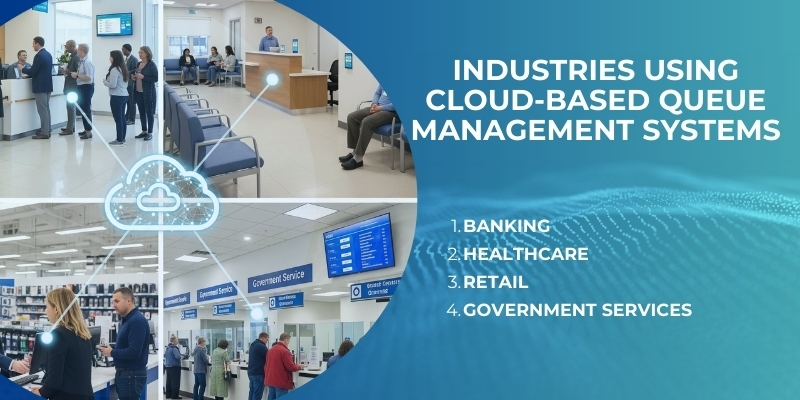
This approach is particularly relevant for banks, healthcare providers, government agencies, telecom operators and retailers managing multiple customer-facing locations. It provides authorized teams with a consolidated view of customer demand, waiting times, employee activity and service performance without requiring every location to operate as an isolated system.
Wavetec: A Global Full-Stack Customer Experience Technology Company
Wavetec is a global full-stack customer experience and self-service technology company with more than 30,000 systems deployed across over 80 countries. Its international footprint is supported by regional offices and implementation teams serving banking, healthcare, telecommunications, government and retail organizations.
Unlike software-only providers, Wavetec designs and develops the customer-facing hardware, queue management software, employee applications, digital signage, enterprise dashboards and integration layers required to manage the complete customer journey. This gives organizations one technology partner across solution design, deployment, integration, customization and lifecycle support.
Wavetec’s cloud-capable portfolio includes the Spectra Queue Management System, Spectra 2.0, WebTSU, F-19 and M-18 ticketing kiosks, Donatello Digital Signage, appointment management, virtual queueing and centralized analytics. These components can be configured around an organization’s service model, hosting requirements, security policies and existing technology environment.
This full-stack approach is particularly valuable in enterprise deployments because physical and digital touchpoints must operate as one connected system. A ticket issued at a branch, an appointment created through a digital channel, an employee action at a service counter and a management report should remain connected through a consistent operational record.
What Is a Cloud-Based Queue Management System?
A cloud-based queue management system is a customer-flow platform in which the central application, configurations and operational data are hosted in an authorized cloud environment.
Connected locations access the platform through secure network connections. Customers enter the journey using physical or digital channels, employees manage queues through service terminals and managers view operational information through centralized dashboards.
A cloud queue management platform can support:
- Walk-in ticketing
- Virtual queueing
- Online appointment booking
- QR-code check-in
- Customer identification
- Priority-based routing
- Browser-based employee terminals
- Counter and lobby displays
- SMS and digital notifications
- Customer feedback
- Real-time operational dashboards
- Centralized reporting
- AI-assisted demand forecasting
- Service and staffing simulation
- Integration with CRM and core business systems
The exact functionality depends on the selected products, approved architecture, customer workflows and required integrations.
Why Are Organizations Moving Queue Management to the Cloud?
Enterprise cloud adoption continues to increase. According to Gartner’s worldwide public-cloud forecast, worldwide public-cloud end-user spending was expected to reach US$723.4 billion in 2025, compared with US$595.7 billion in 2024. Gartner also projected that 90% of organizations would adopt a hybrid-cloud approach through 2027.
The move toward cloud infrastructure is also changing customer-facing operations. Instead of maintaining disconnected systems at individual locations, enterprises can coordinate configurations, service rules, reporting and software updates through a central environment.
This does not mean physical service locations are becoming irrelevant. Accenture’s Global Banking Consumer Study found that 67% of respondents liked seeing bank branches in their neighbourhood because they represented stability and availability, while 63% turned to branches to resolve specific or complicated problems.
These findings support a hybrid customer journey in which digital channels provide convenience before arrival, while physical locations remain available for transactions and conversations requiring human assistance.
Research from McKinsey & Company also estimates that a properly implemented smart-branch model can produce a 60% to 70% improvement in branch effectiveness, measured through a combination of cost savings and increased sales.
Cloud queue management can support this operating model by connecting digital entry points with structured service delivery inside the branch.
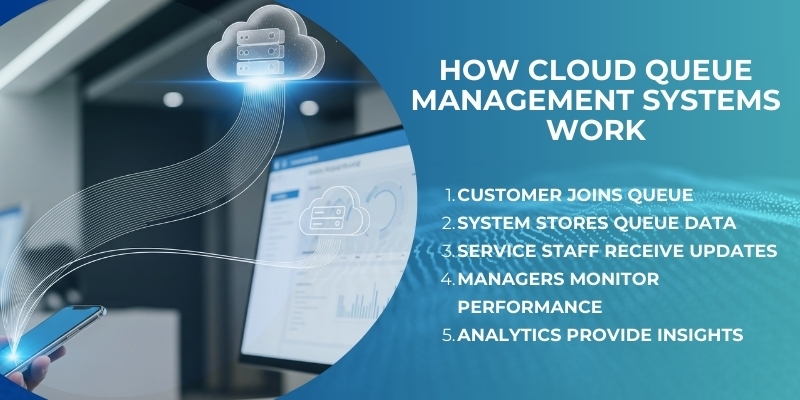
How Does a Cloud-Based Queue Management System Work?
1. The Customer Enters the Journey
A customer can join through an approved physical or digital channel, such as:
- An F-19 or M-18 ticketing kiosk
- A branch reception desk
- A website or mobile application
- A QR code
- An online appointment platform
- An employee-assisted check-in point
The customer selects the required service and may provide identification, appointment or account information where the process requires it.
2. The Request Is Sent to the Central Platform
The request is securely transmitted to the cloud queue management platform.
The system applies configured rules relating to:
- Selected location
- Required service
- Appointment status
- Customer category
- Priority level
- Employee skills
- Counter availability
- Current queue conditions
- Estimated service capacity
These rules determine the appropriate queue and service path.
3. A Ticket or Digital Queue Position Is Created
The platform generates a queue reference. Depending on the entry channel, the customer may receive:
- A printed ticket
- A digital ticket
- An estimated waiting time
- A confirmation message
- Appointment instructions
- A notification when the turn is approaching
Virtual queueing can allow customers to wait outside the immediate service area, provided the organization has defined suitable check-in and arrival rules.
4. Employees Manage the Queue Through WebTSU
Wavetec’s browser-based WebTSU allows authorized employees to call, recall, transfer, hold and complete customer tickets.
The platform can record events such as:
- Ticket issue time
- Call time
- Service start time
- Service completion time
- Transfer activity
- Counter assignment
- Employee identity
- No-show or cancellation status
This creates a structured service record rather than relying on manually compiled branch information.
5. Donatello Digital Signage Guides the Customer
Donatello Digital Signage can display called ticket numbers, counter directions, waiting information and approved promotional content.
Customers may also receive SMS or other digital notifications, depending on the selected configuration and messaging integration.
6. Operational Data Is Centralized
Activity from connected locations is consolidated through dashboards and reporting tools.
Authorized managers can review:
- Average waiting time
- Average service duration
- Number of customers served
- Abandonment and no-show rates
- Service-level performance
- Counter utilization
- Employee activity
- Appointment outcomes
- Demand by branch, service or time
- Peak-period performance
This allows management teams to compare locations using consistent operational definitions.
Wavetec Products for Cloud Queue Management
Spectra Queue Management System
Wavetec’s Spectra Queue Management System coordinates customer check-in, queue creation, priority rules, counter calling, ticket transfers and service completion.
Spectra can support different services, customer categories and operating rules across distributed locations.
Spectra 2.0
Spectra 2.0 builds on Wavetec’s enterprise queue management foundation with advanced analytics, forecasting and simulation capabilities.
Its functionality can include:
- Live branch dashboards
- Network-level performance monitoring
- Waiting-time distribution analysis
- Counter-utilization measurement
- Service-level monitoring
- AI Traffic Forecasting
- Operational simulation
- Ticket and employee-level investigation
AI Traffic Forecasting analyzes historical operational data to estimate future customer demand. Simulation tools allow managers to test scenarios—such as changing staffing levels, service rules or counter capacity—before implementing them operationally.
Forecasts should support human decision-making rather than be presented as guaranteed outcomes. Their reliability depends on the quality, quantity and relevance of the available data.
Learn more about Spectra 2.0 and AI Traffic Forecasting.
F-19 and M-18 Ticketing Kiosks
Wavetec’s F-19 and M-18 kiosks provide physical entry points into the customer journey.
Depending on the configuration, they can support:
- Touchscreen service selection
- Multilingual interfaces
- Ticket printing
- Customer identification
- Appointment check-in
- Priority routing
- Barcode or QR-code scanning
- Accessibility requirements
- Integration with external applications
WebTSU
WebTSU is Wavetec’s browser-based service terminal. It enables authorized employees to manage customer tickets through a compatible browser, reducing the need for separately installed counter applications.
Donatello Digital Signage
Donatello connects queue information with customer-facing displays. It can show ticket calls, counter directions, branch information and approved media content through one managed environment.
Appointment and Virtual Queueing
Wavetec’s appointment and virtual queueing capabilities allow customers to reserve service times or join eligible queues remotely.
Appointments and walk-ins can be managed within the same operational framework, helping organizations balance scheduled demand with customers arriving without bookings.
Nexa Reporting and Enterprise Dashboards
Centralized reporting converts queue activity into measurable operational information.
Managers can investigate performance by:
- Location
- Region
- Service
- Employee
- Customer category
- Day and time
- Appointment type
- Waiting-time range
This helps identify recurring congestion, service bottlenecks and performance differences between locations.
Cloud-Based Versus On-Premise Queue Management
Cloud and on-premise queue management platforms can support many of the same customer-facing functions. The main difference is where the central application is hosted and who manages the underlying infrastructure.
| Consideration | Cloud-based queue management | On-premise queue management |
| Hosting | Approved cloud environment | Organization-owned servers or data centre |
| Multi-location control | Centrally managed | Depends on the internal network architecture |
| Expansion | New locations can join the central environment | May require additional local infrastructure |
| Updates | Can be coordinated centrally | Managed through internal release processes |
| Remote access | Designed for authorized remote monitoring | Depends on internal access controls |
| Scalability | Resources can be expanded according to the architecture | Limited by owned infrastructure |
| Connectivity | Reliable network connectivity is important | Can be less dependent on external connectivity |
| Data control | Managed through hosting, residency and contractual controls | Direct control over infrastructure |
| IT responsibility | Shared across the customer, vendor and hosting provider | Greater responsibility remains with internal IT |
| Best suited to | Distributed networks requiring centralized management | Organizations with strict internal-hosting requirements |
Cloud deployment is not automatically the correct option for every organization. The decision should consider connectivity, data residency, existing infrastructure, integration requirements, internal IT capacity, security policies and business-continuity expectations.
A hybrid architecture may also be appropriate where centralized cloud management must coexist with selected local services or continuity components.
Benefits of Cloud-Based Queue Management
Centralized Multi-Location Management
Administrators can manage service definitions, priority rules and operational settings across connected locations.
This can reduce configuration inconsistencies and make it easier to introduce approved changes across the organization.
Easier Expansion Across New Locations
A new branch can connect to an established enterprise platform rather than requiring an entirely separate central application.
The actual rollout timeline still depends on connectivity, hardware availability, integration, security approval and site readiness.
Remote Operational Visibility
Regional and head-office teams can monitor service conditions without being physically present at every location.
This allows managers to identify increasing waiting times, high abandonment or inadequate counter capacity earlier.
Connected Physical and Digital Channels
Cloud architecture can connect ticketing kiosks with appointments, websites, mobile applications and other approved entry points.
Customers choose how to enter the journey while the organization maintains centralized operational control.
Consistent Reporting
A shared reporting framework gives locations common definitions for waiting time, service duration, abandonment and employee activity.
This reduces reliance on disconnected spreadsheets and locally interpreted performance measures.
Improved Foundation for AI
Centralized operational data can provide a stronger foundation for demand forecasting and simulation than isolated branch-level records.
However, AI recommendations should remain explainable, measurable and subject to authorized operational review.
Connectivity and Service Continuity
Cloud queue management requires reliable communication between service locations and the central platform.
Before deployment, organizations should evaluate:
- Primary and backup connectivity
- Available bandwidth and latency
- Local device dependencies
- Network-security controls
- Offline or degraded-mode requirements
- Data synchronization after reconnection
- Connection-failure alerts
- Recovery-time objectives
- Recovery-point objectives
- Technical escalation procedures
Offline functionality depends on the selected architecture. Buyers should verify which capabilities—such as ticket issuance, counter calling, signage or local data recording—remain available during a network interruption.
Availability claims should only be made when supported by the agreed infrastructure, redundancy, monitoring and continuity arrangements.
Security, Data Residency and Shared Responsibility
Cloud deployment does not transfer every security responsibility to the technology provider. Security remains a shared responsibility between the customer organization, application provider, cloud infrastructure provider and any integration partners.
A cloud queue management security assessment should cover:
- Role-based access control
- Multi-factor authentication where required
- Encryption in transit and at rest
- Administrative audit trails
- Security-event logging
- Data classification
- Data residency
- Backup and recovery
- API authentication
- Vulnerability management
- Retention and deletion policies
- Third-party access
- Incident-response responsibilities
- Business-continuity testing
Organizations should also determine how much personal information the queueing process genuinely requires. Some workflows may need only a service category and ticket number, while others may require identity, appointment or account information.
The increasing importance of controlled cloud environments is reflected in Deloitte’s research on sovereign cloud. Deloitte forecast that the government-cloud market would exceed US$41 billion in 2024, representing 16% year-over-year growth, while the distributed-cloud market was expected to reach US$7 billion, compared with just over US$4 billion in 2022.
These figures reinforce why data location, operational control, hosting architecture and regulatory obligations should be assessed before selecting a cloud queue management platform.
Wavetec’s Security and Quality Credentials
Wavetec’s organizational governance posture is supported by:
- ISO/IEC 27001:2022 certification, supporting a structured Information Security Management System
- ISO 9001:2015 certification, supporting controlled quality-management processes
- SOC 2 credentials, covering relevant organizational controls associated with security and operational governance
- GDPR-aligned data-handling practices where applicable
Wavetec has publicly documented its transition to ISO/IEC 27001:2022 and its attainment of SOC 2 credentials.
These credentials describe Wavetec’s organizational control environment. They do not automatically make every customer deployment compliant with every regulation. Final compliance depends on the approved architecture, hosting region, configuration, integrations, contractual responsibilities and customer operating procedures.
Cloud Queue Management in Practice
BBVA Peru
BBVA Peru deployed Wavetec’s Spectra Cloud-based Queue System across 278 branches, combining cloud-based queue management, CRM-integrated priority logic, mobile-app queueing and centralized analytics.
According to Wavetec’s published case study, the implementation achieved:
- Approximately 35% lower average waiting times
- A 57% reduction in queue abandonment
- 99.93% system availability
These results relate specifically to the BBVA Peru implementation and should not be presented as guaranteed outcomes for every deployment.
Banorte
Banorte implemented Wavetec’s customer-flow management solution across more than 1,000 retail branches in Mexico. The platform connects queue management with live reporting and operational dashboards, giving the bank greater visibility into service performance and branch demand.
United Bank Limited
United Bank Limited uses Wavetec’s enterprise queue management ecosystem to support customer journeys and centralized operational visibility across its branch network. Queue data can help central teams identify service conditions and determine where additional capacity may be required.
Faysal Bank
Faysal Bank expanded Wavetec’s Enterprise Queue Management System across 351 branches, creating a centralized foundation for customer-flow management, branch comparison and service-performance measurement.
Banque Saudi Fransi
Banque Saudi Fransi has deployed Wavetec solutions across more than 100 branches, combining queue management, digital signage, customer feedback and centralized live reporting within its customer-service environment.
What Should Buyers Check Before Selecting a Cloud Queue Management System?
Hosting and Architecture
- Where will the application and its data be hosted?
- Is the architecture public cloud, private cloud or hybrid?
- Which hosting regions are available?
- What availability commitments are documented?
- Which services continue during connectivity interruptions?
- How is branch data synchronized after reconnection?
Customer Access
- Can customers join through kiosks, QR codes, websites and mobile channels?
- Can appointments and walk-ins be managed together?
- Are multilingual and accessible interfaces supported?
- Can customers receive digital queue updates?
- How are late arrivals and no-shows handled?
Queue Configuration
- Can services and priorities be configured by location?
- Can the platform route customers according to employee skills?
- Are appointment, transfer and no-show rules supported?
- Are priority decisions recorded and auditable?
- Can branch-level variations be centrally governed?
Enterprise Management
- Can administrators manage locations centrally?
- Are configuration changes logged?
- Can locations be grouped by region or business unit?
- Are reporting definitions consistent across the network?
- Can access rights be assigned by role and location?
Integration
- Are documented APIs available?
- Can the platform connect with CRM, appointment and identity systems?
- How are failed integration requests handled?
- Are retries and duplicate-prevention controls supported?
- Can events be traced across connected applications?
Analytics and AI
- Are real-time and historical dashboards available?
- Can data be filtered by branch, service and employee?
- Does reporting show distributions and outliers—not only averages?
- How are forecasts generated and evaluated?
- Can managers simulate service-capacity changes?
- Can forecasts be compared with actual outcomes?
Security and Compliance
- Which credentials apply to the provider?
- Which controls apply to the selected hosting environment?
- How are roles and privileged accounts managed?
- Where is customer data stored?
- How are retention and deletion handled?
- Who is responsible for incident notification and recovery?
Support and Lifecycle Management
- Who installs and maintains the customer-facing hardware?
- Is local technical support available?
- How are software releases tested and deployed?
- Can devices, software and integrations be monitored together?
- What availability and response commitments are documented?
- How are operational issues escalated?
Conclusion
A cloud-based queue management system can connect physical locations, digital check-in channels, appointments, employee terminals, customer displays and enterprise dashboards through one centrally managed environment.
Customers gain clearer ways to access services and manage their waiting time. Employees receive structured service workflows. Managers gain visibility across locations, while enterprise teams can use consistent operational data to investigate congestion, plan capacity and improve service delivery.
Successful cloud queue management nevertheless requires more than remote hosting. Organizations must evaluate connectivity, continuity, data residency, cybersecurity, integrations, governance and technical support.
Wavetec brings these elements together through a full-stack portfolio that includes Spectra, Spectra 2.0, WebTSU, F-19 and M-18 ticketing kiosks, Donatello Digital Signage, virtual queueing, appointment management, analytics and enterprise integration.
By combining global deployment experience with proprietary software, customer-facing hardware, integration and lifecycle support, Wavetec helps organizations build cloud-based customer journeys that are connected, measurable and scalable.
Contact Wavetec to discuss cloud, on-premise and hybrid queue management architectures.
Frequently Asked Questions
What is a cloud-based queue management system?
A cloud-based queue management system hosts the central queue application, configurations and operational data in an approved cloud environment. Connected locations use the platform to manage tickets, appointments, service routing, counter activity and reporting.
How does cloud queue management work?
Customers join through a kiosk or digital channel. The central platform applies service and priority rules, creates a queue position and routes the customer to an appropriate employee. Operational activity is then recorded for centralized monitoring and reporting.
Does a cloud queue management system require internet access?
Cloud-connected functions require network connectivity. The effect of an interruption depends on the architecture and any local continuity capabilities. Organizations should confirm which functions remain available offline.
Can a cloud queue system support multiple locations?
Yes. Multi-location management is one of its primary
BOOK A FREE DEMO